


TP-Link TL-WPA4220 powerline adapter kit - AV600 - set of 2
8.9/10 from 538 reviews of our shop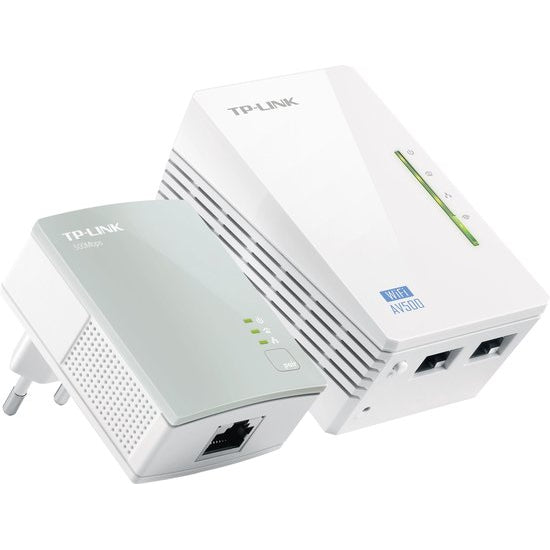


Ideaal als je...
- Wifi wilt uitbreiden naar een ruimte waar het signaal van je router niet komt
- Geen netwerkkabels door het huis wilt trekken: de data loopt via het elektriciteitsnet
- Je bestaande netwerknaam en wachtwoord wilt overnemen met één druk op de knop
- Een spelcomputer, printer, IPTV-kastje of NAS via ethernet wilt aansluiten
Let op als je...
- Gigabit over de kabel nodig hebt: de poorten zijn Fast Ethernet tot 100 Mbps
- Wifi op 5 GHz wilt: deze kit zendt alleen single-band op 2,4 GHz uit
- Een adapter met doorlussend stopcontact zoekt: er zit geen stopcontact in
Description
Internet through the power socket with two powerline adapters that send your connection through your home's electrical wiring. The set reaches up to 600 Mbps over the wiring and extends your wifi with speeds up to 300 Mbps.
About this product longer description
The TL-WPA4220 kit consists of two adapters that bring your internet connection to any room in the house via the electrical wiring. Thanks to HomePlug AV technology, data transmission reaches up to 600 Mbps over a wiring length of up to 300 metres. Any network-compatible device can be connected, from computers and games consoles to IPTV boxes, printers and NAS drives.
The TL-WPA4220 has a Wi-Fi Clone button: with one press, the network name (SSID) and password of your router are copied. You then place the adapter wherever you want wired or wireless access. With wireless speeds up to 300 Mbps, you extend an existing wifi network to other parts of your home or office.
Setup follows the plug & and play principle: plug an adapter that's connected to the internet into a power socket near your router, and connect pcs, laptops, internet TVs or other network devices to the other adapter via an ethernet cable or wifi. You use the pairing buttons to set up security or to manage multiple powerline adapters on the same network.
Two tips from our specialist: don't place the adapters in a power strip, as they work less well there than in a grounded power socket. And the quality of your electrical wiring also affects the speed, which is often a bit lower in older homes.
Features 6 features
- Powerline up to 600 Mbps - data travels through the electrical wiring, over a wiring length of up to 300 metres
- Wi-Fi Clone button - copies the network name (SSID) and password of your router with a single button press
- Wifi up to 300 Mbps - sends a wireless signal on 2.4 GHz to areas your router can't reach
- 2 Fast Ethernet ports - connect devices without wifi to these, with speeds up to 100 Mbps
- Plug & play - plug it in and the powerline network is up within minutes, installation is via the WPS button
- Pairing buttons - use this to set up network and data security or manage multiple adapters on the same network
Specifications 11 technical details
| Colour | White |
| Colour family | White |
| Target group | Unisex |
| Manual language | English |
| Model | 2-pack |
| Manufacturer article number | KD12457 |
| Number of products in package | 2 |
| Wireless connection | Yes |
| Product dimensions (l x w x h) | 94 x 4 x 940 cm |
| Dimensions (l x w x h) | 19.2 x 14 x 10.4 cm |
| Weight (incl. packaging) | 381 g |
Item number P-13623-0EAN 6935364032258Manufacturer number KD12457Brand TP-LINK
What's in the box? 5 items
Adapters
- Powerline Ethernet adapter TL-WPA4220
- Powerline Ethernet adapter TL-PA4010
Cables and software
- Ethernet cable (RJ45), 2 m
- CD with utility software
Documentation
- Installation instructions (English)
Frequently asked questions 4 questions
How do I connect the adapters?
First plug the adapter that's connected to the internet into a power socket near your router. Then connect your pc, laptop, internet TV or other network device to the other adapter via the ethernet cable or via wifi. Finally, press the pairing buttons for network and data security.
Do I need to set up a new wifi network?
That's not necessary. The TL-WPA4220 has a Wi-Fi Clone button that takes over the network name (SSID) and password of your router. You can then place the adapter wherever you want wireless or wired access.
Do I always get the maximum speed?
The stated 600 Mbps over the wiring and 300 Mbps wireless are maximum values. The quality of your electrical wiring affects the speed of your powerline network; in older homes this is often a bit lower. So place the adapters in a grounded power socket and not in a power strip.
Can I connect devices without Wi-Fi?
Yes. The TL-WPA4220 has 2 Fast Ethernet ports for devices without wifi, with speeds up to 100 Mbps. Think of a games console, printer, IPTV box or NAS drive. A 2-metre ethernet cable is included in the box.
Warranty & returns conditions
- Caasi warranty - 1 year: product faulty? Contact Caasi. We arrange free repair or replacement. Is the product no longer in our range? Then you get the current market value refunded
- Manufacturer's warranty - 3 years from TP-Link: after the Caasi warranty, you can also go to the manufacturer for repair or replacement
- Covered: defects in materials and workmanship under normal use
- Not covered: wear and tear, damage from drops or knocks, incorrect use
- Returns policy: 30 days to change your mind - not satisfied? Return it for free
What customers say
Prachtig apparaat
Het apparaat geeft alles netjes aan!
 Omron M4 Connect AFib bloeddrukmeter - bluetooth - AFib-detectie - geheugen 120 metingen
Mooi glanzende huid
 Mesoestetic ampullen - anti-aging flash
Goed geluid en makkelijk te installeren
 Kenwood M-9500SB micro hifi-systeem - smart - WiFi - Zwart
Prachtige geur
Blijft lang hangen de geur,warm en mooie geur
 Mont Blanc Signature eau de parfum - spray - 90 ml
Every review comes from a customer who bought the product from us. We ask for it after delivery, publish the critical ones too and change nothing.